Here is the trick that broke Anthropic's own Postgres MCP server. The server wrapped every query in a read-only transaction. It never checked whether you sent more than one statement.
BEGIN TRANSACTION READ ONLY;
SELECT 1;
COMMIT;
DELETE FROM orders;The COMMIT closes the read-only transaction, and the DELETE runs in a fresh one with whatever rights the connection has. I ran it this morning against Postgres 16 in Docker. As a superuser, the row was gone. As a role that only holds SELECT, Postgres answered cannot execute DELETE in a read-only transaction, and when I switched that default off as well, permission denied for table orders.
That is the whole post in two runs. The read-only switch in your MCP server is a filter. The role in your database is a boundary. Set up the second one first.
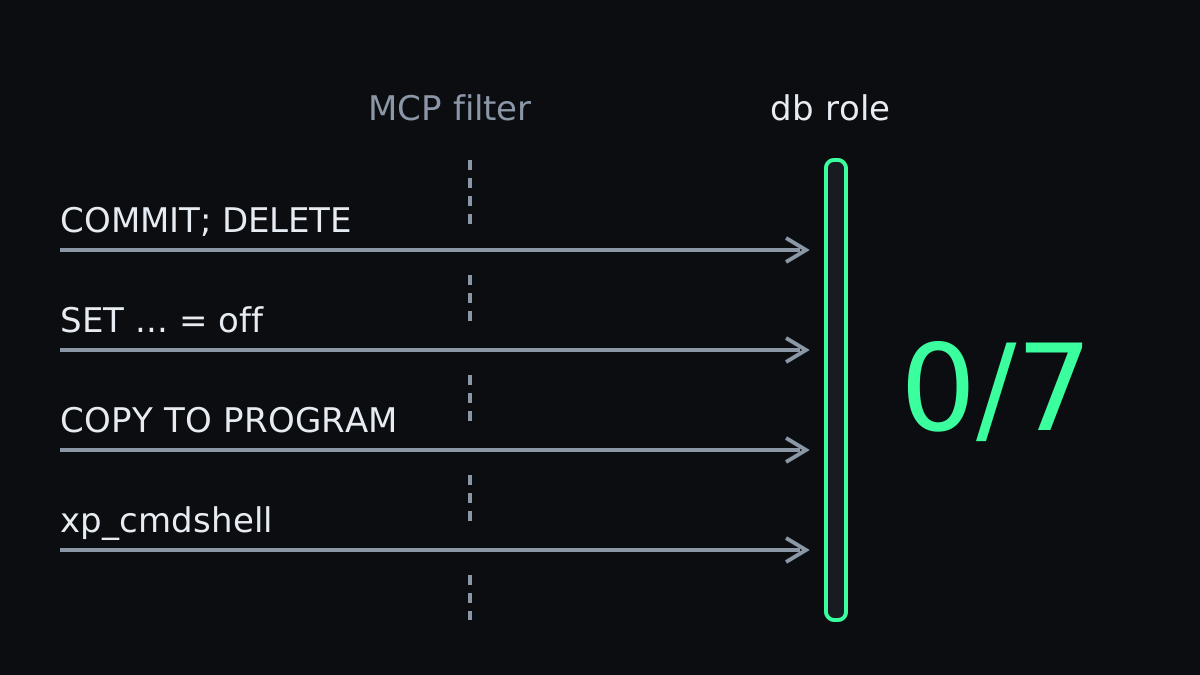
Read-only mode in an MCP server is a filter
Datadog Security Labs published the COMMIT bypass in August 2025. By then the reference server had been deprecated for six weeks, and the npm package was still pulling 21,000 downloads a week. I checked npm this morning: in the week to 28 October it was downloaded 179,402 times.
The hole was never limited to one package. In July 2026, Maximilian Hildebrand published read-only bypasses in 14 SQL MCP servers, including the official MariaDB one and three for SQL Server. The bypasses fall into a few families:
- Denylists that miss a verb. None of the denylists he tested contained
SET. One SQL Server server checked forDROPfollowed by a space, soDROP/**/walked straight past it. - Validating only the first statement.
SELECT 1;followed by anything. WITHas a wrapper. Six servers allowedWITHwithout checking what came after it.
In September, AWS published bulletin 2026-104 for its own Postgres MCP server: a COPY ... TO PROGRAM statement could get through the read-only validation and run operating system commands, on self-managed Postgres where the database role held superuser or pg_execute_server_program. AWS's own advice is the one this post rests on: connect with a dedicated role that holds only the privileges it needs.
A filter has to recognise every way SQL can write. The database already knows, because it is the thing doing the writing.
That includes my own. When I ran the same bypass families against Argos, the MCP server I built for database access, eleven cases got through. Among them were set_config, which can switch a read-only session back to read-write, and a zero-width space inside a keyword. They are fixed now, and the point stands: I wrote that filter with care, and it still had holes.
The role, step by step
I covered the full recipe, including column-level grants, in the guide to safe SQL access for Claude. What follows is the minimum, plus what I threw at it.
PostgreSQL.
CREATE ROLE claude_ro LOGIN PASSWORD 'change-me';
GRANT CONNECT ON DATABASE app TO claude_ro;
GRANT USAGE ON SCHEMA public TO claude_ro;
GRANT SELECT ON ALL TABLES IN SCHEMA public TO claude_ro;
ALTER DEFAULT PRIVILEGES IN SCHEMA public GRANT SELECT ON TABLES TO claude_ro;
ALTER ROLE claude_ro SET default_transaction_read_only = on;
ALTER ROLE claude_ro SET statement_timeout = '15s';As claude_ro I tried three things. The read-only default refused the COMMIT trick, and after SET default_transaction_read_only = off the permissions refused the DELETE. COPY orders TO PROGRAM 'id', the AWS bypass, failed because the role lacks pg_execute_server_program. The row count afterwards was still one.
SQL Server.
CREATE LOGIN claude_ro WITH PASSWORD = 'Change-me-123!';
CREATE USER claude_ro FOR LOGIN claude_ro;
ALTER ROLE db_datareader ADD MEMBER claude_ro;
DENY SELECT ON dbo.Users (Email) TO claude_ro;Four attempts, four refusals: BEGIN TRAN; SELECT 1; COMMIT; DELETE, EXEC xp_cmdshell 'whoami', SELECT ... INTO a new table, and ALTER ROLE db_owner ADD MEMBER claude_ro. The column DENY held for SELECT * too.
Across both engines that makes 0/7: seven attempts to write or escalate, none of them past the role. The MCP server never came into it, because I sent these straight to the database. That is the point. Whatever your server's filter misses, this layer catches.
Azure without passwords
On Azure the password can go entirely. Azure SQL and Azure Database for PostgreSQL both accept a Microsoft Entra token, and az login gets you one. No secret in a config file, nothing to rotate.
There is a catch, and it sits in who that token belongs to. With az login, the MCP server queries as you. If you are the person who set the server up, you are quite possibly its Entra admin, and Microsoft is explicit about what that means: "Administrator accounts are members of the db_owner role in every user database, and each user database is entered as the dbo user."
So the passwordless setup that feels the most secure can hand the agent dbo. Then the MCP server's filter is the only thing between it and a DELETE, the same kind of filter those 14 servers got wrong.
Passwordless removes the secret and leaves the privilege where it was. The fix is the same role, attached to an identity that is not you.
Azure SQL. Create a group or a dedicated identity in Entra for the agent, and map it as a reader:
CREATE USER [DB Readonly] FROM EXTERNAL PROVIDER;
ALTER ROLE db_datareader ADD MEMBER [DB Readonly];Then sign in as that identity in a separate Azure CLI profile, so your own az login stays yours:
export AZURE_CONFIG_DIR="$HOME/.azure-claude-ro"
az loginArgos takes the token from the Azure CLI with authentication=azure-cli. Start it with that AZURE_CONFIG_DIR in its environment and it connects as the reader. With several databases in one config, azure_config_dir=~/.azure-claude-ro on a single database does the same for that database only. Before you trust it, check who you actually are, as your first query through the server:
SELECT USER_NAME() AS db_user,
       IS_ROLEMEMBER('db_owner') AS is_owner,
IS_ROLEMEMBER('db_datawriter') AS is_writer;If db_user comes back as dbo, stop and fix the identity before you do anything else. Argos now runs this kind of check itself every time it connects to a select_only database, on all four engines, and warns when the role can write. Set require_readonly_role=true and it refuses the connection instead.
Azure Database for PostgreSQL. Same idea, different function. Microsoft's Entra guide maps a group with pgaadauth_create_principal, after which you grant it SELECT like any other role:
SELECT * FROM pgaadauth_create_principal('DB Readonly', false, false);
GRANT USAGE ON SCHEMA public TO "DB Readonly";
GRANT SELECT ON ALL TABLES IN SCHEMA public TO "DB Readonly";The token goes in as the password. Microsoft notes it is valid for 5 to 60 minutes, so the client has to fetch a fresh one for each connection. Argos does that with the same authentication=azure-cli setting it uses for SQL Server, and forces a verified TLS connection, because a bearer token on an unverified wire goes to whoever answers.
Wiring it into Claude Code
Register the server with the read-only identity's profile in its environment, so Claude Code never sees your own credentials:
claude mcp add argos --scope user \
  -e AZURE_CONFIG_DIR="$HOME/.azure-claude-ro" -- \
argos serve --config "$HOME/.config/argos/config.ini"Keep the server's own read-only mode on as well. It is a second net, and a good one stops a runaway query, such as a nine-way join across your biggest tables, before the database has to carry it. Just don't let it be the only one. Whatever server you pick, run it through the checklist for vetting an MCP server before it sees a connection string.
I learnt the cost of a missing boundary the expensive way, the day Claude deleted my production database. All it took that day was an agent connected with more rights than the task called for, and that is the one thing you can rule out with a handful of lines of SQL.