In August I wrote that my Claude Code sessions had no clock, built one, and closed with a promise: ask me in a month and I will have a number.
That was almost seven weeks ago. Here is the number. It surprised me.
I assumed the agent's time went into thinking. A big model, long reasoning, a spinner that turns because something hard is happening. Over a month of my own sessions, the main agent spent 74 hours generating and 117 hours waiting on its tools. And part of that waiting was the agent sitting idle while I was somewhere else.
How I measured it
Claude Code writes every session to a JSONL transcript, and every record in it carries a timestamp. That is enough to time almost everything.
- A tool call runs from the record where the model asks for the tool to the record where the result comes back.
- Model time runs from each input (my prompt, or a tool result) to the last thing the model writes before it calls the next tool, cut at the end of each turn so idle gaps between turns do not count.
- Subagents keep their own transcripts, which I measured separately.
The transcripts on my machine go back to 4 September. Through 4 October that is 127 sessions, 1,804 prompts from me, 3,503 turns and 1,106 subagent runs, on Claude Code 2.1.260 through 2.1.289, almost all of it in auto mode.
One limit matters for everything below. The clock on a tool call includes any approval prompt in front of it, and the transcript does not record the prompt. So when a call "took" twenty minutes, some of those minutes may have been the agent waiting for me to click yes. I come back to that.
Most of the time is in the tools
The model's own steps are quick: a median of 5.5 seconds between getting a result and asking for the next tool.
The hours add up elsewhere. Across the main agent in the month:
| Where the time went | Hours |
|---|---|
| Model generating | 74 |
| Bash | 69 |
| Waiting on my answers | 29 |
| Foreground subagents | 10 |
| Everything else (Edit, Read, MCP, web) | 17 |
The tool rows add up to 125 hours. Calls that ran in parallel overlap, so on the wall clock the agent spent 117 hours waiting on tools.
Inside the subagents the share is higher still: Bash took 48 of their 55 tool hours, 87%.
Of everything the agent waits on, the shell weighs the most.
Half of all shell time is 1.4% of the calls
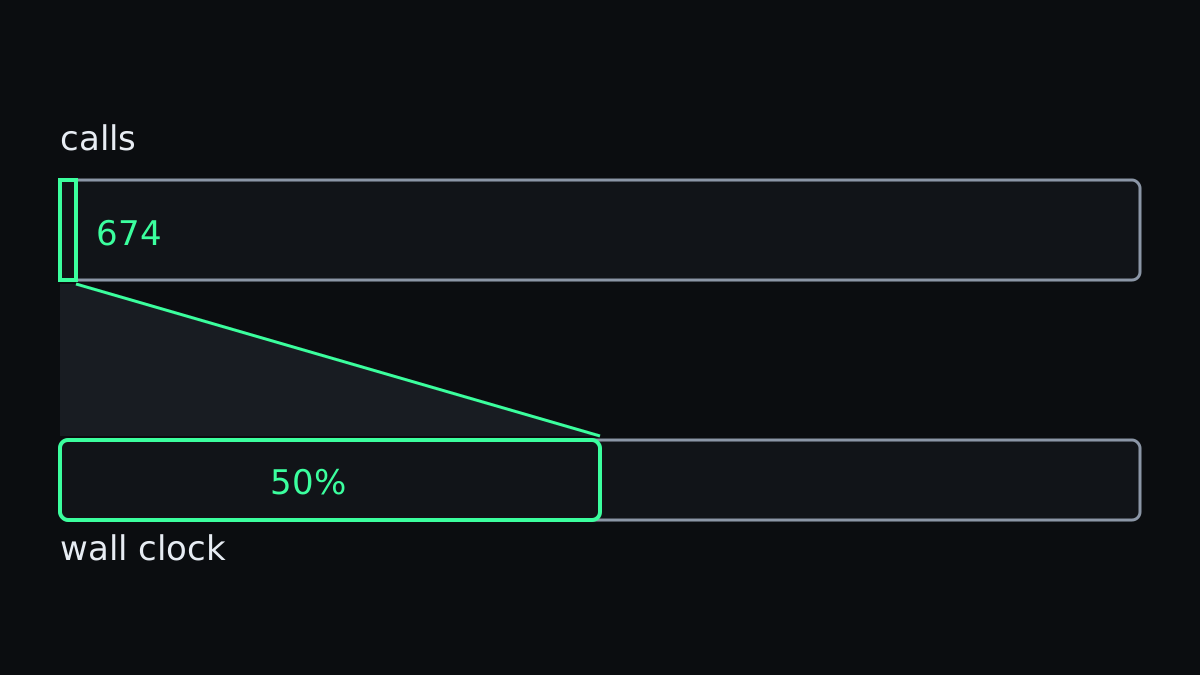
Across main agent and subagents together, Bash ran 46,574 times in the foreground, for 117 hours. The median call took 1.3 seconds, and nine in ten finished within 9.8 seconds.
Then the tail. The slowest 674 calls, 1.4% of them, hold half of all Bash time. The 1,420 calls that ran longer than a minute hold 76 hours, almost two-thirds.
Sorting those hours by what the command did:
- Tests: 22 hours, a fifth. No surprise and no regret, because a suite that takes time is doing its job, and an agent that runs it is the point of the exercise. In turns that ran tests the median was two runs, and the record was 77 in a single 69-minute turn: a fix loop on one of my own projects.
sleepand polling loops: 12.6 hours. Most of that is the agent writingsleep 60or awhileloop around a status check, and blocking the whole conversation until it returns.- Reading and searching (
cat,grep,find): 19 hours, scripts 16, git 11,forloops 10, builds and type checks 3. - A fifth I could not classify: compound one-liners that
cd, set a variable, loop and pipe in one call.
The sleep hours bother me most, because the fix already exists. Claude Code can run a command in the background and tell the agent when it finishes. In the month, 690 calls used that. 1,420 calls blocked the foreground for more than a minute.
Failures barely register
1,277 tool calls failed in the month. The largest group, 518, were shell commands that exited non-zero. Together the failed calls took 8 hours. A failure is loud in the transcript and quiet on the clock.
A few long turns hold the hours
The turns have the same long tail as the shell calls. 1,892 of them, more than half, were over within a minute, and together they make up 5% of all turn time.
At the other end, 39 turns ran for more than an hour. Those 39 hold 38% of the clock. Everything over a quarter of an hour, 205 turns, is two-thirds of it.
What working with the agent feels like and what it costs in hours are two different things. Most of what I see is a quick exchange. Most of what the clock records is a few long stretches.
The slowest tool is me
The agent spent 29 hours waiting on AskUserQuestion, the tool it uses to put a multiple-choice question in front of me.
It asked 468 questions in 382 calls. The median answer came in 53 seconds, and 205 calls were answered within a minute. When I am at my desk, a question costs less than a minute.
When I am not, it costs hours. Two questions waited more than an hour each, 9.4 hours between them. Nobody was there to answer them.
The same thing hides inside the tool clock. An Edit takes milliseconds, yet 42 edits and writes "took" more than a minute, 1.9 hours in total. Those minutes are almost certainly approval prompts: an edit to a file a hook guards, a write outside the project.
That 1.9 hours is a floor. A Bash command that waited on approval looks exactly like a Bash command that ran for a long time, and with 117 hours of shell time I cannot separate the two. Any "Bash is most of your tool time" number, my own plugin's included, carries some of my coffee breaks in it.
Two sessions hide some of the wait
The main agents ran 283 hours of turns, and those fit into 231 hours of wall clock. For 44 of those hours, two or more sessions were working at once.
That is the counterweight to everything above. For about a fifth of the busy time more than one agent was at work, so a wait in one session did not leave everything standing still.
What I changed
Every fix comes down to the same thing: stop letting the waits block the conversation.
- Long commands go to the background. A test suite, a build or a remote run gets
run_in_background, and the agent does something else or ends its turn. One line inCLAUDE.mdasks for it. If asking is not enough, that is what hooks are for. - No
sleeploops. Waiting for CI or a deploy belongs to a background watcher that tells the agent when something changed. A foreground loop freezes the whole conversation. - Questions before I leave. If the agent will need a decision, it should ask while I am still there. "Ask everything you need now, then work unattended" is a perfectly good prompt.
- A second session for the long waits. Overlap already absorbed 52 hours of turn time this month. A worktree per session keeps two agents out of each other's files.
- Fewer prompts for the safe things. Every approval prompt is a place the agent can stall. The permissions guide covers allowing what is safe so that the prompts left are the ones worth stopping for.
None of this says the agent helped or did not help. A twenty-minute test run that caught a regression was twenty good minutes. Turn these numbers into a target and you are back to measuring the wrong thing.
What they did tell me is where the afternoon went. Less into thinking than I imagined, a lot into a shell that waited on a test suite, and a surprising amount into waiting for me.