To steer Claude Code while it works, you have three moves. Press Esc to stop the current response or tool call: Claude keeps the work done so far and waits for your redirect. Type a message and press Enter to queue it: Claude Code hands it over as soon as the running tool calls finish, inside the same turn. Or type /btw for a side question that never enters the conversation.
All three work. I ran the same task forty times, in two sizes, to find out what the timing costs, and every run passed. What differed was the bill: on the bigger task, correcting after the agent finished cost a median 56% more than saying it up front. Stopping it with Esc at its first edit cost nothing extra there.
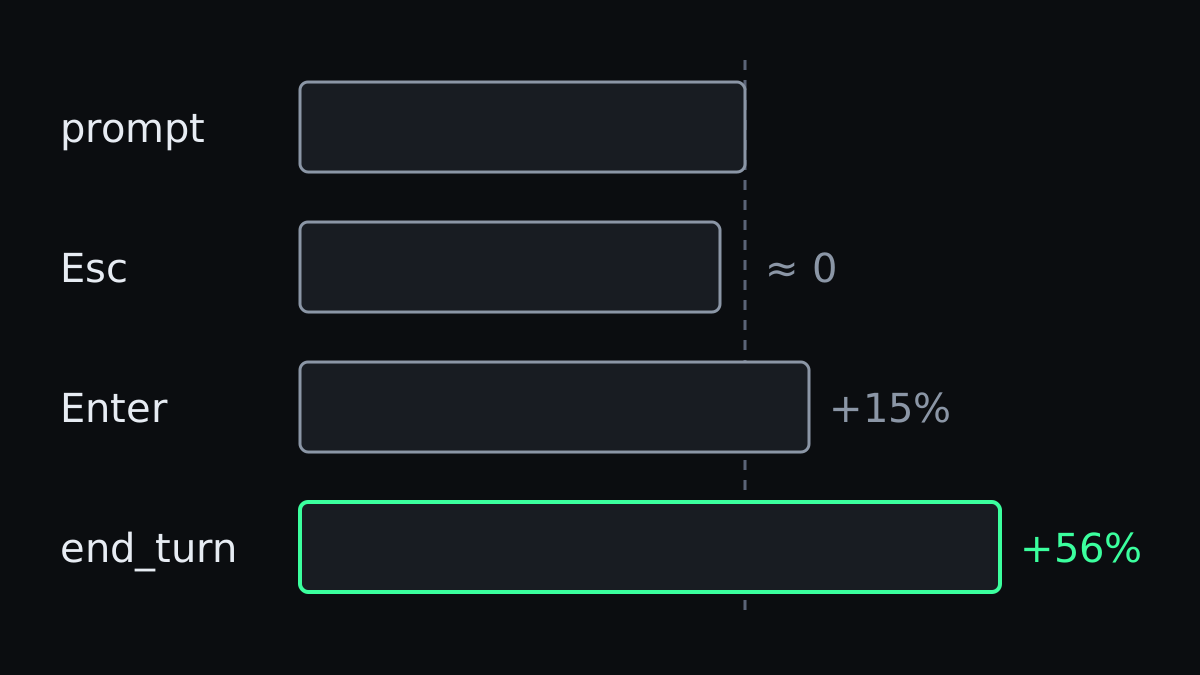
The experiment
A small Node project with three CLIs reading the same sales CSV. The task: add --since and --until date options to all three. Then the correction you always think of a moment too late: put the filtering in one pure function in lib/filter.js with its own unit tests, reject impossible dates like 2026-02-30 with exit code 2, and document both flags in the README.
Four routes, five runs each, identical text every time:
- Brief: task and correction in the first message.
- Esc: task alone, interrupted at the agent's first file edit, then the correction.
- Queue: task alone, correction queued at the first file edit, no interrupt.
- Late: task alone, correction after the agent reports it is done.
Claude Code 2.1.293 on Opus 5.5, headless, with no user settings, hooks or CLAUDE.md loaded. A script scored each result on twelve checks. I ran a one-CLI version of the same task first, scored on seven. It left the agent little room to wander, which is why the three-CLI version exists.
| Route | Small task | Multi-file task | Edits (multi-file) | Wall time (multi-file) |
|---|---|---|---|---|
| Brief | $0.22 | $0.35 | 7 | 72 s |
| Esc | +4% | $0.33, same | 9 | 78 s |
| Queue | +15% | $0.40, +15% | 9 | 85 s |
| Late | +25% | $0.55, +56% | 15 | 124 s |
Medians. All forty runs passed every check. The agent always got there. It just did more work on the way, and the later the correction, the more it had to undo: by the time the late route heard the real requirements, it had made six to eight edits that the correction turned into rework.
These are cents on a task that takes a minute. That is the point of the second column, though: going from one CLI to three, the late penalty more than doubled while Esc dropped to zero. Your real tasks are longer than mine.
Before it starts: give it the context you have
The cheapest correction is the one you never need to send. Most of what I put in the correction was knowable before the first prompt, and on the multi-file task every route that started without it made more edits.
Two things make the brief better without making it longer:
@a file to put its full contents in the conversation.@src/lib/filter.tsbeats "the filter helper" every time. On a directory you get only a listing.- Paste a screenshot with
Ctrl+V(Alt+Von Windows and WSL,Cmd+Vin iTerm2), drag it in, or give its path. A layout bug described in words costs a round trip that the picture skips.
The research agrees, from the other side. In Ambig-SWE, agents that asked clarifying questions on underspecified tasks performed up to 74% better than agents that just started. Plan mode is the built-in version of that: the agent shows you its approach before it writes anything, which is the cheapest moment to object.
Esc: stop, keep the work, redirect
The interactive mode docs describe Esc precisely: "Stop the current response or tool call mid-turn so you can redirect. Claude keeps the work done so far."
That second sentence is why it cost so little in my runs. The agent keeps what it has: it has read the code, it knows the CLIs, and it has one edit it now has to revisit. You lose only the direction it was heading in, which was the wrong one anyway.
The habit to build is pressing it at the first sign, not the third. Anthropic's best practices put it as "Correct Claude as soon as you notice it going off track", and the reason shows up in the research on how agents fail. Failure as a Process traced failed runs of CLI coding agents on Terminal-Bench, with no human in the loop, and found that "half of all failed trajectories have already committed their decisive error by step 7, but do not become unrecoverable until around step 12, and do not produce externally observable evidence until around step 16."
Between step 7 and step 16 the agent is still working, and it looks like it is going fine. That gap is where Esc pays off.
Queue a message when it is close enough
You can also talk to the agent without stopping it. Type while it works and press Enter. Per the docs, "Claude Code passes it to Claude as soon as those tool calls finish, within the same turn."
That is softer than Esc, and in my runs it cost 15% more than the brief on both tasks, because the agent finishes the batch of tool calls it is in before it reads you. Fine when the correction is a detail. When the direction is wrong, every tool call it completes first is work you are paying for and then paying to undo.
Two keys make the queue more useful than it looks. Ctrl+Enter sends queued messages right away. And Up from the first line of the input box takes your queued messages back so you can edit them before they go out.
One catch: a message queued mid-turn gets no checkpoint of its own. To undo what Claude did after it, you rewind to the prompt that started the turn.
/btw for the question that is not a correction
Halfway through a task you wonder why it picked a library, or which file handles the auth. Asking in the main conversation puts the question and the answer into the context for the rest of the session.
/btw is for exactly that. The docs: "Use /btw to ask a question about your current work without adding to the conversation history." It sees everything so far, has no tools, and runs while Claude keeps working. If the answer needs tools after all, press f to fork it into a background subagent.
When to stop correcting and start over
Steering has a limit. Each correction leaves the failed attempt in the context, and models get more likely to make mistakes when their earlier errors are in front of them. Anthropic's best practices draw the line: "If you've corrected Claude more than twice on the same issue in one session, the context is cluttered with failed approaches."
At that point you have two exits. Esc Esc opens the rewind menu, where you return to the prompt before the detour and send it again with what you have learned. Or you clear the session and start with a brief that includes the correction from the start, which was the cheapest route in my experiment, or tied for it.
Steering is the skill
Anthropic studied around 400,000 Claude Code sessions for its June report on expertise and agentic coding. One of its conclusions: "Part of the value of expertise appears to be the ability to steer the agent in the right direction." Among the users it rated as novices, 19% of sessions ended abandoned, against 5 to 7% for everyone else.
Experienced users also interrupt more often. An earlier Anthropic study found new users interrupting in 5% of turns and more experienced users in around 9%. They know when a turn is heading somewhere expensive, and they say so while it is still cheap.
That is all steering is. The agent will get there either way. You decide how much of the trip you pay for twice.