WSL fell over and took Claude Code with it, mid-turn, about two hours into something I did not want to reconstruct.
So I did the obvious thing. Opened a terminal, went back to the directory, ran claude --resume.
The session was not in the list.
Absent: not truncated, not buried at the bottom, not hiding under a title I failed to recognise. Meanwhile the transcript of that entire two hours was sitting on the disk, a few directories away, completely intact.
That gap is the whole subject of this post.
The transcript is a file. The session was a process
These are two different things, and almost everything about how we talk about agent sessions blurs them together.
Claude Code writes every turn to a JSONL file under ~/.claude/projects/, one directory per project you have opened it in, as it happens. That file is only ever appended to, and what has already reached the disk does not care what happens to the process writing it. Kill the terminal, kill WSL, pull the power: the bytes already written stay written.
The picker is something else. It is a feature of a client that is running now, and it exists to help you pick up something you put down on purpose. When it works it is genuinely good, and on 2.1.269 claude --resume takes a search term and does real work for you.
But it is a convenience of a healthy client. I had been treating it as a recovery tool, and those are not the same job. The moment the thing that crashed is also the only thing that can show you what it lost, you have a single point of failure with your afternoon inside it.
I cannot tell you why my session was missing from that list. I could not reproduce it, and the transcript of the session in question is intact.
There is crash damage on this disk, mind. Five files of it: one zero-byte transcript, and four whose last block is a run of NUL bytes where a write never landed. Every one of the five is a subagent transcript, and not one is a session I could have resumed anyway. So the damage is real, and it sits well away from the session I lost.
What I can tell you is that the file was there and the client would not offer it, and that I have stopped assuming those two facts travel together.
What a crash actually leaves behind
Claude Code keeps a registry of live sessions in ~/.claude/sessions/, one small JSON file per process, naming a session id and the directory it was running in.
Right now this machine has 262 of them, and ten will not parse at all. Of the 252 that do, every one carries a session id and a working directory, though only 62 still carry a status. For 248 of them the process they name is gone. And 30 of those are still filed as busy: sessions that were mid-turn when whatever happened happened, with nothing behind the PID any more.
That is a picture of what a crash leaves on your disk. Whether any of it explains my own missing session, I genuinely do not know. Processes die in the middle of things and the paperwork stays behind, describing a state that stopped being true.
The transcripts underneath are in far better shape. Ten registrations in 262 will not parse. Five transcripts in 1,422 will not. Appending to a file is boring, and boring is the point.
The sessions Claude Code will not offer you
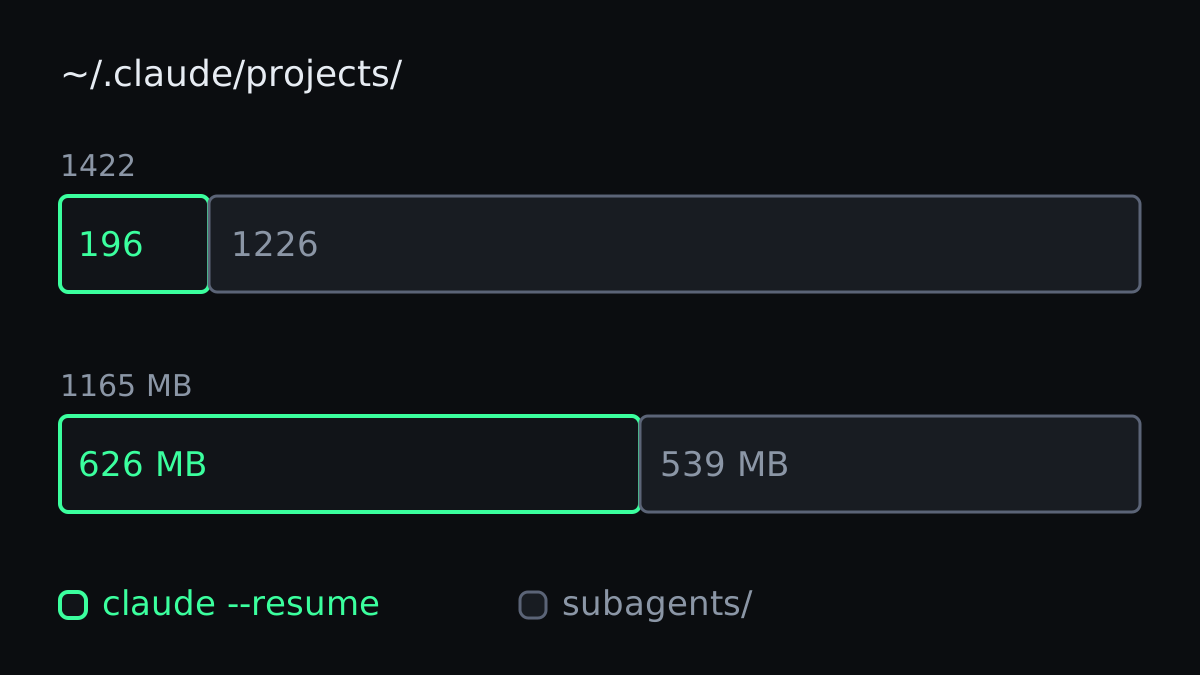
While I was counting, I found the bigger hole.
This machine holds 1,422 transcript files under ~/.claude/projects/, 1,165 MB of them. Only 196 are top-level sessions, the shape that has a resume path at all, and those come to 626 MB across 72 project directories.
The other 1,226 files, 539 MB of them, are subagent transcripts. They sit in a subagents/ directory beside the session that spawned them, one per agent dispatched.
Claude Code will never offer you one. They are not sessions you can attach to, they have no resume command, and from the client's point of view they are implementation detail.
They are also where an enormous amount of my actual work happened. Every time I fan out a review across four agents, or hand a search to an explore agent rather than burning my own context on it, the reasoning lands in one of those files. Six to one against the sessions I drove by hand, by count.
This is the part that bites hardest when you run multiple agents. The more work you delegate, the larger the fraction of your history that lives in files your client treats as plumbing. You cannot resume them, and you cannot even look at them without knowing the path by heart.
What got me back
The repair was dull, which is how you want a repair to be.
I ran nekyia index, which reads the transcript stores already on the disk and commits what changed to a local SQLite index. Then I searched it. The session came up, the way a file comes up in grep, because nothing in that path asks a running Claude Code anything.
Two things made it work rather than merely find something.
The first is that it reads across every project directory at once, projects/*/*.jsonl, not the one you happen to be standing in. After a crash you do not reliably come back to the same place, and "which of 72 directories was that" is a question I could not answer about my own afternoon.
The second is that it knows each session's original working directory from the index, so it launches claude --resume <id> in that directory rather than in the one you typed the command from. An id on its own drops you somewhere arbitrary. A resume needs the id and the directory it belongs to, together.
The move that actually found it was nekyia blame, which lists recent sessions that touched a given file. I could not remember how I had phrased anything two hours in, but I knew exactly which file I had been editing when the screen went away. Searching by the thing I had been doing beat searching by the words I had used, and after a crash that is usually the asymmetry you are working with.
I wrote about searching agent history across clients when the sessions are merely old, which is the same index doing a calmer job. Recovery is the case where it stops being a convenience.
What it does not get back
The transcript is the conversation. That is all it is.
Resuming from it gives you back what you asked, what came back, and which files moved. It does not give you the tool state, the file snapshots, the shell you had open, or anything the process was holding in memory when it died. For a client where an exact attachment is not a safe bet, what you get is a handover brief, and its first line says so.
So what came back was the argument rather than the two hours. I got back the reasoning, the approach I had tried first and abandoned, and the list of files I had touched, and I redid the last ten minutes myself.
That is a fair trade, and it is worth being precise about it, because a tool that claimed to restore the whole machine state would be making the same error as an agent that is confidently wrong about a function signature. It looks right until you lean on it.
It is still pre-release, 0.0.19 now, installed from the repository rather than npm, with a fuller write-up of what it does. The index over this machine's sessions is 52 MB, runs locally, makes no network call and holds no tool output.
Durability is a property of the format
The crash taught me that I had misplaced my trust one layer too high.
Your agent history is durable because it is append-only text on a filesystem. It is reachable because some program reads that format. When the only program that reads it is also the program that can crash, the durability is real and the reachability is not, and you will not discover the difference on a good day.
This is the same shape as the argument for keeping memory files honest rather than comprehensive, and for managing a live session's context deliberately. Those are disciplines for the session you are in. This is the question of what survives it.
Check it before you need it. Find out where your client writes its transcripts, and find out today whether anything other than that client can read them. The answer is cheap to get when nothing is broken, and it is the only thing you will want at the moment something is.
Mine was two hours. It would have been a week if the files had not been there.