A colleague asked me recently how I had built my marketplace. And whether the same thing would work on GitHub Enterprise.
Easy question, I thought. All my plugins and skills install from aranea-marketplace, so I only had to show what was in it. Once I started writing it down, the answer turned out a good deal longer than the file the question was about.
Because that file is small. The format Claude Code reads fits in twenty lines of JSON. Everything else in the repository exists because twenty lines turned out not to be enough. Mine is generated anyway, by a generator I wrote for a file I could just as well have typed.
What a marketplace is
A marketplace is a git repository, a URL or a directory with a .claude-plugin/marketplace.json in it. Three fields are required: name, owner and plugins. Each plugin needs a name and a source. That's it.
{
  "name": "acme",
  "owner": { "name": "Acme platform team" },
  "plugins": [
    { "name": "design-system", "source": "./plugins/design-system" },
    {
      "name": "release-notes",
      "source": {
        "source": "url",
        "url": "https://acme.ghe.com/platform/release-notes.git",
        "sha": "<full 40-character commit SHA>"
      }
    }
  ]
}A source is either a relative path starting with ./ or an object of type github, url, git-subdir, npm, archive or command, according to the marketplace reference. Your colleagues add it with claude plugin marketplace add and install with claude plugin install design-system@acme. Run claude plugin validate . yourself first, so you hear it from the validator before a colleague comes to tell you.
That is the whole format. You can have it running in fifteen minutes.
The rest of this post is about the three months after that.
How to build a marketplace that covers more than plugins
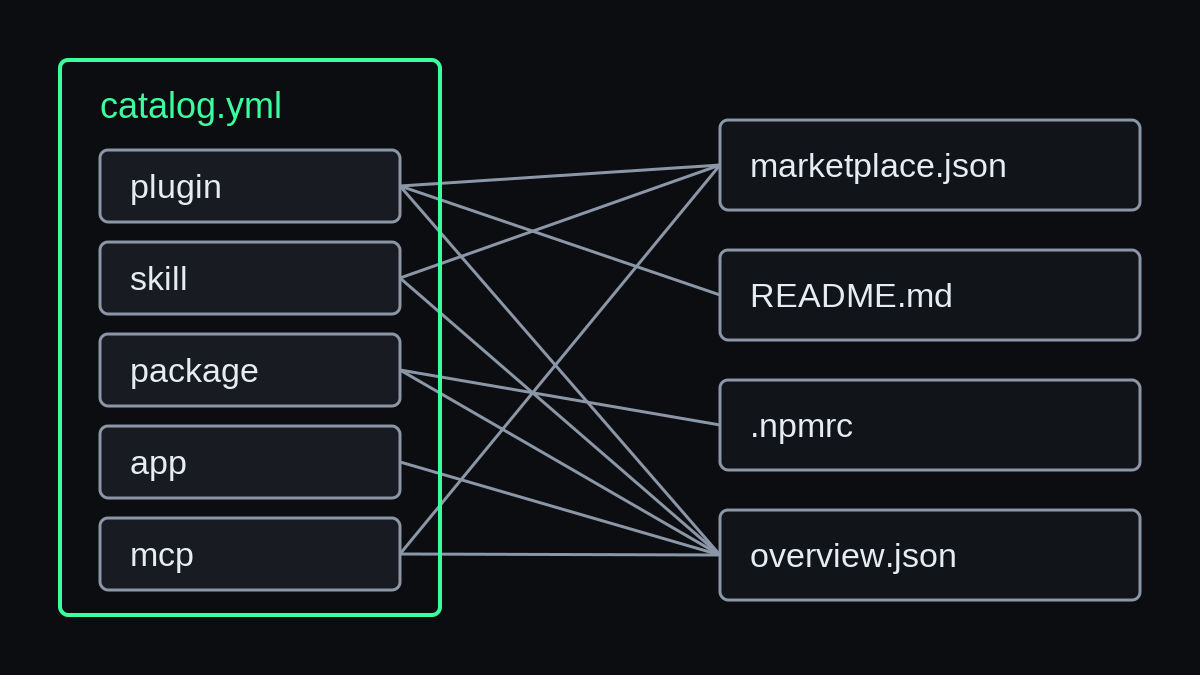
In aranea-marketplace I edit exactly one file by hand: catalog.yml. From it, a generator writes three things: the Claude Code manifest, a feed my site builds its tool pages and install blocks from, and the install block in every plugin's README. If a generated file drifts from what the catalogue produces, CI fails.
Why not use the manifest itself as the source? Because the manifest only knows what Claude Code can install. My catalogue also lists tools with their own setup, such as standalone CLIs and MCP servers. Those get kind: site and only a page on the site.
For an organisation, that is the difference between a list of plugins and an overview of everything floating around internally. Put in the catalogue what exists, including the things Claude Code has no use for:
marketplace: acme
entries:
  - id: design-system
    kind: skill
    source: { type: local, path: plugins/design-system }
  - id: release-notes
    kind: plugin
    source: { type: git, url: https://acme.ghe.com/platform/release-notes.git, commit: '…' }
  - id: ui-tokens
    kind: package
    source: { type: npm, package: '@acme/ui-tokens', registry: https://npm.acme.ghe.com }
  - id: orders-api
    kind: app
    url: https://orders.internal.acme.example
    owner: team-orders
    repo: https://acme.ghe.com/platform/orders-api
  - id: tickets-mcp
    kind: mcp
source: { type: git, url: https://acme.ghe.com/platform/tickets-mcp.git }Each kind gets its own output. skill and plugin go into the manifest, and so does mcp, for a reason I come back to below. A package produces an install block with the right .npmrc lines.
An app has nothing to install, so it gets an address, an owner and a repository. All of it lands in one internal overview, and a new colleague no longer has to ask around on day one to find out what exists.
Any list somebody maintains by hand is, six months later, the list that lies. That is why the aranea-marketplace README links to the site, which is itself built from the catalogue, and keeps no plugin list of its own.
How do you install the rest?
What a colleague reads is the overview. Every entry there carries the block the generator wrote for it, and that block looks different per kind:
# skill or plugin: design-system
claude plugin install design-system@acme

# mcp: tickets-mcp
claude plugin install tickets-mcp@acme

# package: ui-tokens, add to .npmrc
@acme:registry=https://npm.acme.ghe.com
//npm.acme.ghe.com/:_authToken=${NODE_AUTH_TOKEN}
# then
npm install @acme/ui-tokens

# app: orders-api
https://orders.internal.acme.exampleSo the MCP server installs as a plugin. That works because a plugin may bring an MCP server along: a .mcp.json at the plugin root is enough, according to the plugins reference. Have the generator wrap every mcp entry in a thin plugin like that, and the server arrives through the same marketplace, with the same pins and the same allowlist as everything else.
For the package, .npmrc holds only a variable. npm fills in ${NODE_AUTH_TOKEN} from the environment, so the file can live in the repository.
The app gets a link. If you want the agent to work with that API as well, write a skill next to it, and that goes through the marketplace like any other. The link itself is the only install block in the overview that never fails.
Beyond Claude: installing other plugins and apps
Up to here, only Claude Code gets a real install. Everything else gets a block in the overview and a colleague who types it over. To make other plugins and apps installable too, the same rule applies as for Claude Code: for each ecosystem, generate the file that ecosystem already reads, and let its own tool do the installing. That way you never have to build a package manager yourself.
| Kind in the catalogue | What the generator writes | What a colleague types |
|---|---|---|
plugin, skill, mcp | .claude-plugin/marketplace.json | claude plugin install …@acme |
| plugin for another agent | that agent's own marketplace | that agent's install command |
| CLI or desktop app | a Homebrew tap in a GHE repository | brew install acme/tools/… |
package | .npmrc lines | npm install @acme/… |
| container image | the image reference in your registry | docker pull … |
app | link and owner | nothing |
I tested the Homebrew route on the same GHE host, in a clean homebrew/brew container with Homebrew 4.6.20 and a second throwaway repository. A tap is a git repository of formulae, and brew tap accepts a full URL:
brew tap acme/tools https://acme.ghe.com/platform/homebrew-tools.git
brew install acme/tools/acme-helloWithout credentials the tap died on the same could not read Username as Claude Code. With the insteadOf rule from the CI part below, tap and install worked first time. Brew runs plain git as well, so a credential helper that works for Claude Code should work for brew too. That last part I did not test separately.
The formula fetches its source through git, with a tag and a revision:
url "https://acme.ghe.com/platform/acme-hello.git", tag: "v0.1.1", revision: "<full commit SHA>"That way the download goes through the same credentials, and the revision doubles as a pin. One thing cost me an attempt: when the source holds exactly one directory, brew helpfully steps into it, and your formula can no longer find bin/acme-hello. A README in the root was enough to cure brew of its helpfulness.
Codex has a plugin marketplace of its own as well, with its own format. I did not test it for this post, so there is no example of it here.
If you want one command for everything, a small acme CLI can read the overview and call the right tool per kind. Handy, as long as it stays a thin layer. Once that CLI starts downloading and installing by itself, you are building a package manager after all, and nobody asked for one.
Pins that follow releases
A plugin from another repository is pinned to a commit. That is the deal with your users: what you reviewed is what runs. Since Plugin4Shell, Claude Code also verifies that the checkout really landed on that commit.
A pin you update by hand, though, never gets updated. In aranea-marketplace a scheduled workflow therefore checks the latest published release of every plugin every six hours.
Drafts and pre-releases do not count. A pin only moves when the release commit is ahead of the current pin and carries a .claude-plugin/plugin.json with a version. A re-tag or a force-push can never move it backwards.
Every move goes into one pull request that merges itself once validation passes. The workflow runs as a GitHub App, which looks like overkill until you see why: a pull request opened with the workflow's own token triggers no other workflow. Without the App, your pull request waits very patiently for a check that is never going to run.
Then the trap I walked into myself, while testing for this very post. I changed the text of a skill, pushed, and asked for an update:
✔ hello is already at the latest version (0.1.0).Up to date. Apart from the new text not being in it.
Claude Code looks at the version field in plugin.json first, and the hosting docs say so without ceremony: "If you set "version": "1.0.0" and push new commits without changing it, users don't receive them." Only after a bump to 0.1.1 did the change come through. An unchanged version number says nothing changed, and Claude Code takes you at your word.
So bump the version on every release, or leave the field out. Without one, Claude Code uses the commit SHA as the version for a git source.
A private marketplace on GitHub Enterprise
Then the other half of the question. Internal plugins do not belong on github.com, so the marketplace goes on a private GitHub Enterprise host. The documentation only covers GitHub Enterprise Server, and the string ghe.com does not appear in it.
So I tested it: Claude Code 2.1.331, a GHE Cloud host with data residency, one of those company.ghe.com addresses, a throwaway repository and an isolated config directory. Creating that repository was the easy part. Throwing it away again turned out to need a token scope I had never asked for.
The starting point is in the hosting docs: "Claude Code has no git token of its own, and marketplace.json has no field for one." Claude Code runs plain git on your machine with prompts switched off, and uses whatever credentials are already there. Everything that goes wrong below follows from that.
- The shorthand means github.com.
claude plugin marketplace add acme/claude-pluginstried to clonehttps://github.com/acme/...and ended inRepository not found. The GHES page says the same: "Theowner/reposhorthand always resolves to github.com." - Without
.gityou get a baffling error. Anhttps://URL that does not end in.gitis fetched as amarketplace.json. A private host returns no JSON, and the message readsInvalid input: expected object, received string. Technically accurate, and exactly as helpful as it sounds. - The full URL works, as long as
gitalready has access:claude plugin marketplace add https://acme.ghe.com/platform/claude-plugins.git. - A token in your environment is not enough. I set
GITHUB_TOKEN,GH_TOKENandGH_ENTERPRISE_TOKEN, all three, with an empty git config, and git still asked who I was:could not read Username ... terminal prompts disabled. The docs say the same holds for the background update: such a variable "alone doesn't authenticate the background check". A token only works through a credential helper.
On your own machine, two commands fix it:
gh auth login --hostname acme.ghe.com
gh auth setup-git --hostname acme.ghe.comAfter that, adding, installing and updating all worked. The background update uses the same helper and never prompts. When it fails, the old checkout stays in place and you hear nothing about it. Until 2.1.280 that background update ignored credential helpers altogether, according to the changelog.
In CI
For GitHub Actions, the docs for organisations recommend GH_TOKEN plus gh auth setup-git. On a GHE host that stalls. gh only uses GH_TOKEN for github.com, and told me I was not logged in to the host.
With GH_ENTERPRISE_TOKEN and GH_HOST the setup succeeded, but the helper then returned no credential. That was gh 2.45, the version Ubuntu handed me, so a newer one may do better.
What did work, without gh:
git config --global \
  url."https://x-access-token:${MARKETPLACE_TOKEN}@acme.ghe.com/".insteadOf \
"https://acme.ghe.com/"The token stays in the runner's git config, and the marketplace clone keeps the plain URL. Give the token read access to the marketplace and plugin repositories only. The workflow's own token can only reach its own repository.
Rolling it out to the team
A repository can propose a marketplace, in .claude/settings.json:
{
  "extraKnownMarketplaces": {
    "acme": {
      "source": {
        "source": "git",
        "url": "https://acme.ghe.com/platform/claude-plugins.git"
      }
    }
  },
  "enabledPlugins": {
    "design-system@acme": true
  }
}Propose, and nothing more. The entries "apply only in a folder the contributor has trusted, and in an untrusted folder Claude Code ignores them without a message", and "Setting enabledPlugins in the repository doesn't install the plugin." Every colleague installs it themselves. It is the same pattern as sharing Claude Code config with a team: anything that grants something, a repository can only offer.
To enforce it, use managed settings. There you set strictKnownMarketplaces, an allowlist of sources. Your own host needs a hostPattern, because "A github source always counts as github.com":
{
  "strictKnownMarketplaces": [{ "source": "hostPattern", "hostPattern": "^acme\\.ghe\\.com$" }]
}An empty list locks everything out, Anthropic's official marketplace included. blockedMarketplaces is the counterpart and is checked first. I did not test this side myself. Managed settings apply to the whole machine, and I preferred my own sessions not to lose their plugins halfway through this post.
Auto-update is off by default for a marketplace you add from your own git host. The docs switch it on for Anthropic's official marketplaces such as claude-plugins-official and leave it "off for every other marketplace". For managed marketplaces that is about to change: the 2.1.331 changelog announces that marketplaces in managed extraKnownMarketplaces will auto-update by default "on or after November 30, 2026". To opt out, set "autoUpdate": false on the entry.
Add that to pins that follow releases, and a new release reaches the whole team within hours. Which is exactly what you want, right up until the release is broken. Never let that pin workflow merge without validation.
Where to start
- Start with the catalogue, not the manifest. Generate the manifest, the overview and the install blocks from it, and let CI fail when they drift.
- Pin external plugins to a commit, and let a workflow move those pins to releases, forwards only.
- Generate the format each ecosystem already reads, and let its own tool do the installing.
- Bump
versionon every release, or leave the field out. - On GHE, always use the full
.gitURL, and authenticategitthrough a credential helper. - Propose in the repository and enforce in managed settings, with a
hostPatternfor your own host.
My colleague asked how I did it. The short answer is twenty lines of JSON. The honest answer is a catalogue with a marketplace as a by-product, and that is the only shape that stays correct once packages, apps and MCP servers have to live next to the plugins.
And yes, it works on GitHub Enterprise. As long as git itself can already reach the host.