This is what Claude Code wrote to disk after I pressed "Yes, and don't ask again" on a database command:
{
  "permissions": {
    "allow": ["Bash(PGPASSWORD=canary-not-a-real-password-7f3a psql *)"]
  }
}Congratulations, you now own a password manager. Plain JSON, no encryption, and without an ignore line, a git add ., commit and push to a public repo tells the whole world your password.
My password is fake. The ones Apiiro found probably aren't. It counted 104,185 public copies of .claude/settings.local.json on GitHub, and 1,122 of them hold a real secret: database passwords, cloud keys, SSH root logins.
"Real" is Apiiro's word. It means the value matches a provider format or sits next to a public host, because they didn't try a single one. Apiiro also sells AppSec, so take the tone with a pinch of salt. The method is published, though, and the mechanism took me no effort to reproduce on Claude Code 2.1.319.
The story reached Hacker News on Saturday. Boris Cherny, who runs Claude Code, answered there with three points: git ignores the file automatically, use auto mode, and turn on secret scanning. All three are reasonable. I used throwaway repos with their own git config to see how far they get you.
My own files came first. This repo's allow list has 413 rules. That's no longer a security setting, it's a diary.
Apiiro says one in ten files over 8 KB holds a real secret, and mine is 33 KB. So I went through it by hand, then through about 35 other repos. All clean, because this is something I always watch for. But then the protection is me and nothing else, and one lapse is enough.
The gitignore lives in your home directory
Boris: "We automatically gitignore it when Claude creates the file, so in this case the files were manually created and checked in."
The start of that holds up. In a normal repo, Claude Code puts **/.claude/settings.local.json in your global git excludes, and the file disappears from git status. That's how it should work, and it does.
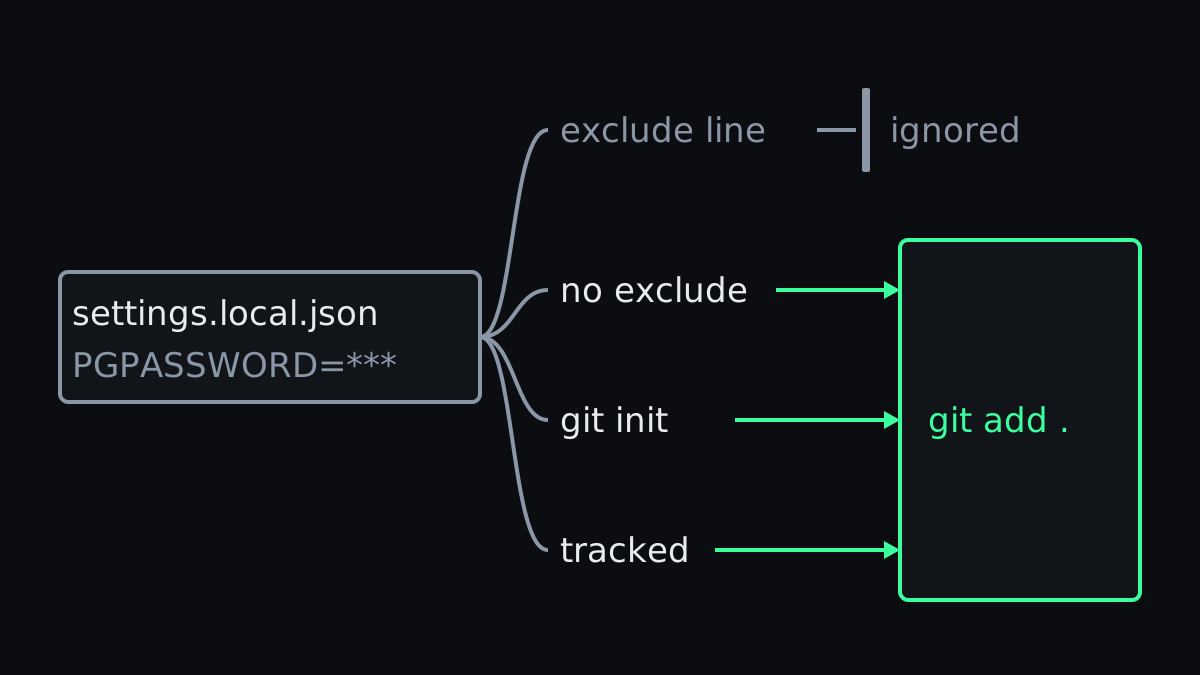
According to the settings docs, though, that line goes in a file in your home directory. The repo knows nothing about it. Apiiro names three ways around that, and I got all three working:
| Situation | What git does with the password |
|---|---|
| Normal repo, same machine | ignored |
| Same project, no exclude line (copied, in a container) | git add . stages it |
| Folder that only becomes a repo later | git add . stages it after git init |
| File already tracked | new rule lands in the diff, no warning on screen |
I simulated the second row with an empty git config. That's what a copied or mounted project looks like on a machine where Claude Code hasn't set that line yet. The third row also ran on a machine without it: there was no repo yet, and no exclude line appeared. In the fourth the line did appear, but an ignore rule does nothing for a file git already tracks.
And "manually"? In that third row Claude Code created the file itself, so I can't find the hand in question. Apiiro's numbers cover the checking in: in 539 of the 1,105 repos it traced, a commit co-authored by Claude changed the file. And Anthropic's own changelog says this about its self-hosted runner under 2.1.307, from 21 October: "Fixed sessions with --use-anthropic-git-proxy committing a .claude/settings.local.json left in the clone by an earlier session".
That doesn't settle it. Some of those commits may be older than the exclude line: an issue from November 2025 already quotes the promise. I can't date it more closely, though Apiiro's median file was first committed months later.
A commit also doesn't show who created the file, and I didn't test whether Claude commits it itself. But in nearly half the traced repos a commit co-authored by Claude changed the file, and "manually" doesn't cover that.
In August I wrote about sharing Claude Code config with a team, and said a file made by hand or with the Write tool gets past the exclude line. So there are more ways past it, and my advice from then only gets more urgent: put the line in the repo's own .gitignore. Then it travels with the project.
Auto mode avoids the file, until it asks you something
Boris: "Permission rules are old hat. Everyone should be using auto mode instead."
For something that's old hat, that file has 104,185 public copies on GitHub.
Auto mode does help against this leak. It's the default now (I ran the dialog tests in manual mode), and the same command ran in it with no dialog, no rule and so no file. One run, one command, on Haiku 5.5, but it beats a dialog you learn to dismiss.
The gap sits where auto mode hands the decision back to you. A reader pointed that out: "This still presumably happens in auto mode as it asks for sensitive commands". Boris replied: "Yeah good catch." I didn't reproduce that path, so here you'll have to go on his answer.
Auto mode doesn't clean up either. A rule already on disk stays there, and Apiiro's median repo had the file committed 217 days before the scan. For what a mode and a rule each control, see the permissions guide. And auto mode has limits of its own.
Scanners look for keys, and this is a password
Turn on secret scanning, Boris said. Do that, and know what it looks for.
Apiiro ran gitleaks and TruffleHog over all 104,185 files. Of the 1,122 with a real secret, gitleaks flagged 564, TruffleHog 643, and 215 got past both. A password after sshpass -p has no provider prefix. To a scanner it's an ordinary word in an ordinary command.
I wrote four rules with fake passwords myself, and the same gap showed up:
| Rule contains | gitleaks 8.30.1 | TruffleHog 3.99.8 |
|---|---|---|
PGPASSWORD=... | flagged | missed |
sshpass -p '...' | missed | missed |
mysql -p... | missed | missed |
Authorization: Bearer ... | missed | missed |
Four rules I wrote myself say something about direction and nothing about a rate. Both tools did flag a control file with keys in known formats, so the setup wasn't to blame. I didn't test GitHub's own scanning, which is the one Boris recommended.
The $VAR fix doesn't work as described
Apiiro's advice is to reference secrets as $VAR, "so the rule records $DB_URL, not the secret". I tried PGPASSWORD=$DB_PASS psql ... and psql "$DB_URL" .... On 2.1.319 neither gets a rule recorded, because the option disappears:
A variable in this command can't be checked before it runs
Do you want to proceed?
❯ 1. Yes
  2. Yes, and switch to auto mode
3. NoThe secret stays out of the file, which is the point. The price is getting the question every time, unless you switch to auto mode. And that question is exactly what you wanted to get rid of.
What did work was exporting PGPASSWORD in the shell before starting Claude Code, so the command doesn't mention the password at all. The dialog then offered psql *, and the file got Bash(psql *) with no secret in it. That rule is broad, so decide whether you want it.
What to check today
This finds every copy under your home directory and prints the lines that look like a password in a command:
find ~ -type f -path '*/.claude/settings*.json' -not -path '*/node_modules/*' \
-exec grep -HnE 'PGPASSWORD=|sshpass -p|mysql .*-p[^ ]|Bearer |://[^/ :]+:[^@ ]+@' {} +It only catches those patterns, so read your allow lists yourself as well. However long they are. Then, in each repo:
git ls-files .claude/
git log --all --oneline -- .claude/settings.local.json .claude/settings.json- Found a secret? Rotate first. Deleting the file doesn't clear history, forks or clones. Apiiro found 734 secrets that survive only in earlier versions of the file.
- Put the ignore line in the repo. Add
.claude/settings.local.jsonto.gitignore, and rungit rm --cachedif it's already tracked. - Read the dialog's second option. It shows you the rule it will save, password included. Mine read
Yes, and don't ask again for: PGPASSWORD=canary-not-a-real-password-7f3a psql *. - Add those command patterns to your pre-commit hook. The grep above is a good start, because your scanner probably won't catch them.
Boris says the team will prototype a few approaches "before we ship something", with "building in basic secret scanning" among them. Good. Until then, one click that saves you a prompt also decides where your password ends up. Of all the protections around it, only one travels with your code, and you have to add that one yourself.